
How to do binary long division
Enter the dividend in the first field and the divisor in the second. Select Calculate to see the binary quotient, remainder, and one step per dividend bit. The tool accepts unsigned integers written with zeros and ones. Standard spacing and underscores can separate digits for readability. The browser calculates the result locally.
The dividend is the quantity being divided. The divisor is the size of each group. In 1101 ÷ 11, enter 1101 first. Reversing the fields asks how many groups of 1101 fit inside 11, which gives a quotient of zero. A quick comparison before submitting can catch transposed values. If the first input is at least as large as the second and the divisor is positive, a zero quotient would indicate that the submitted values were different from what you intended.
Use the trace when you are working through a homework problem or checking an implementation. Compare your calculation one line at a time. Each row begins with the partial value after bringing down a bit, displays the comparison, and then shows the new quotient bit and the subtraction. If your final answer differs, find the first row where your partial value or quotient bit differs. Later rows depend on that value, so checking the final line alone usually does not identify where the error began.
Read one dividend bit at a time
Start with a remainder of zero and read the dividend from left to right. Bring down the next bit by doubling the old remainder and adding the bit. Compare this partial value with the divisor. If it is at least as large, write 1 in the quotient and subtract the divisor. Otherwise write 0 and carry the partial value forward. The last value left is the remainder.
The rule works because the remainder from each completed step is less than the divisor. The next partial value is twice that remainder plus either zero or one. It can therefore reach at most one less than twice the divisor. You never need to subtract the divisor twice in a single step. For a divisor of 11, a previous remainder of 10 can become at most 101 when the next bit is one. Subtracting 11 once leaves 10, which is in range again.
You can also think of each row as a division of the prefix you have already read. When one more bit comes in, both the old prefix value and its quotient are shifted left. The old remainder shifts left as well, and the new bit is added to it. The comparison tells you whether that shifted remainder contains one more copy of the divisor. That is why the rule still works if the input begins with several zeros, or if the divisor has more digits than the prefix you have read so far.
Worked example: 1101 ÷ 11
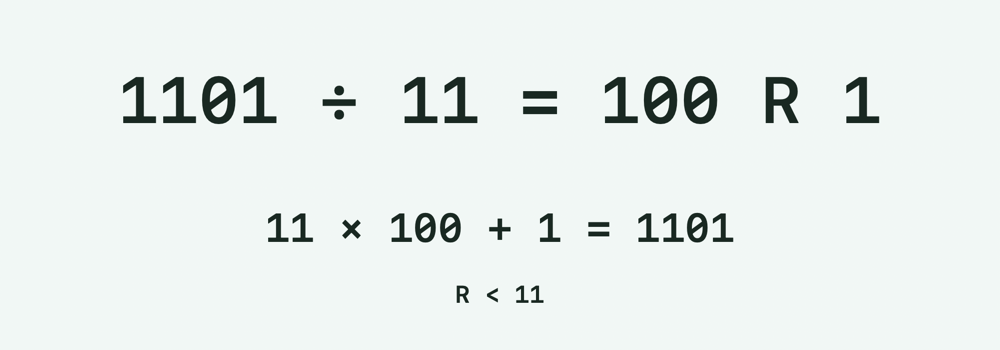
With divisor 11, the first partial value is 1, so the first quotient bit is 0. Bring down the next 1 to get 11, write 1, and subtract to leave 0. The next bit is 0, so the third quotient bit is 0. Bringing down the final 1 leaves a partial value of 1, below the divisor. The trace produces 0100, displayed as quotient 100, and remainder 1.
In a handwritten calculation, you might start by putting 11 under the first two digits of 1101 and writing the first nonzero quotient digit above the second digit of the dividend. The calculator includes the earlier comparison against the prefix 1. This extra zero at the front of the trace makes the position of every processed bit explicit. After finding the first one, keep recording quotient zeros for later positions. Dropping either of the last two zeros in 100 would change the quotient.
For a different pattern, try 1111 ÷ 11. After the first two bits, the quotient contains 01 and the remainder is zero. The next bit contributes a quotient zero and leaves remainder one. The last bit then makes the partial value 11, so the final quotient bit is one and the remainder is zero. The quotient is 101. This example shows why a zero inside the quotient stays even though the leading zero is omitted from the display.
Check the quotient and remainder
Multiply the divisor by the quotient and add the remainder. You should recover the dividend exactly, and the remainder must be smaller than the divisor. Here, 11 × 100 = 1100 and adding 1 gives 1101. In decimal, the same check is 3 × 4 + 1 = 13. Use the multiplication tool linked below to check the product in binary.
The recomposition check detects wrong quotient bits and arithmetic mistakes, but check the remainder bound as well. With dividend 1101 and divisor 11, a proposed quotient of 11 and remainder of 100 reconstructs the dividend: 11 × 11 + 100 = 1101. It is still not the integer division answer because 100 is larger than 11. There is room for one more copy of the divisor. Moving it from the remainder to the quotient yields 100 with remainder 1.
To check a large input by hand, begin with the remainder bound and then multiply using shifts and addition. Copy the binary quotient into the multiplication tool and multiply it by the original divisor. Add the remainder to the product with the binary addition tool, then compare the resulting digit sequence with the original dividend after removing any leading zeros. Decimal checks are convenient for short examples, but the binary check works without changing bases or rounding long numbers.
Exact division and small dividends
Try the second example, 101010 ÷ 110. Its quotient is 111, with zero remainder. When the dividend is smaller than the divisor, the quotient is 0 and the remainder is the dividend. For example, 10 ÷ 101 gives quotient 0 and remainder 10. A positive divisor of 1 leaves the dividend as the quotient.
A divisor with a single one followed by zeros represents a power of two. For 101101 ÷ 100, read off the two trailing bits as the remainder and the preceding bits as the quotient. The result is quotient 1011 and remainder 1, because the trailing group 01 has value one. This shortcut follows from shifting left by two positions when multiplying by 100. For a divisor such as 11, use the general compare-and-subtract process instead because its value is not a power of two.
When the dividend is zero, every comparison produces a zero quotient bit and the final remainder is zero. If the divisor equals the dividend and is positive, the quotient is one and the remainder is zero. These cases are handy for checking the first step and the last step of a new implementation. For an exact result, the final remainder must be zero, even if intermediate remainders are nonzero.
Input limits and output format
Each input can contain up to 256 characters, including separators. The quotient and remainder are displayed without leading zeros, except that zero is shown as 0. Leading zeros in the dividend remain visible as extra steps in the trace. Copy result copies the quotient. The remainder is shown separately, and a nonzero remainder is never rounded into the quotient.
Pasting binary from a programming environment can introduce formatting that looks like part of the number. Remove source-language prefixes, suffixes, and signs. Spaces and underscores are accepted as group separators, but the character limit includes them. If a 256-digit value already uses the full limit, remove its separators before pasting it here. A representation such as 00000011 is accepted as the value three. The number of leading zeros does not set a signed word width.
To reuse a remainder in another calculation, select its displayed value separately. The result is a string of binary digits, with no base prefix. Some programming languages interpret the pasted digits as decimal unless you supply a binary prefix or explicit base. Check the format expected by the destination before comparing the two results. If you need a fixed-width output for a worksheet or a register diagram, add the required number of leading zeros after copying.