
How to convert ASCII to binary
Paste a short message into the ASCII text field, choose seven or eight bits, and select Calculate. The ASCII to binary converter looks up each character code and writes that number in base two. One space separates adjacent output groups. The result panel also lists each group beside its decimal code and character, so you can inspect the conversion rather than trusting an unexplained string of digits.
Start with the supplied Hello example if you want a quick reference. In eight-bit mode, its first character H becomes 01001000 because uppercase H has decimal code 72. Lowercase letters use different codes: h is 104, so changing case changes the result. The tool preserves the case of your input and never turns letters into uppercase automatically.
When you edit the input or change the width, the previous result clears. Select Calculate again to produce output for the current settings. Clear empties the field, while the example buttons load complete sample inputs and calculate their results. This workflow makes it clear which text belongs to the displayed output. Use Copy only after the result you want appears; the copied value contains binary groups, not the explanatory table or character labels.
Seven bits or eight bits
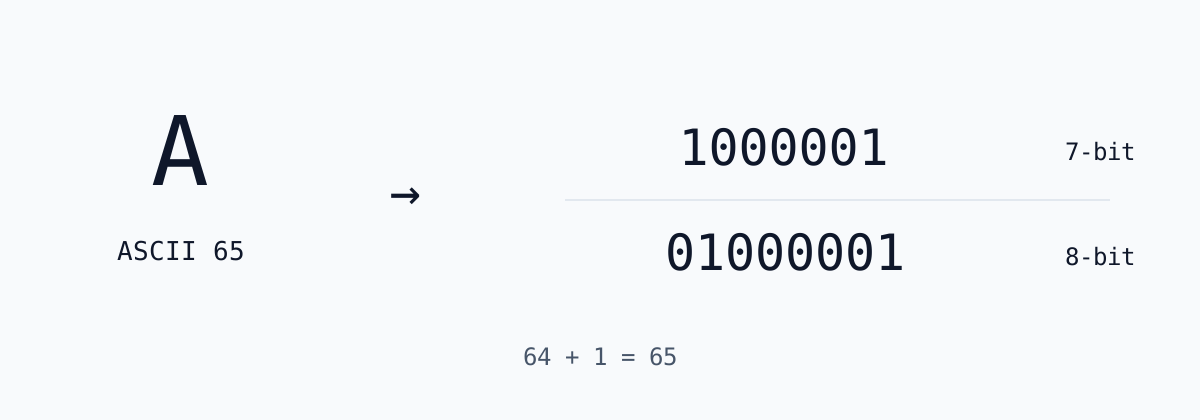
Standard ASCII contains 128 code points, numbered zero through 127. Seven binary digits are enough to represent that range. For example, capital A is 1000001 in seven-bit form. An eight-bit representation adds a leading zero, giving 01000001. Both groups represent decimal 65; the extra zero changes the width rather than the character. The ASCII to binary width selector applies the same rule to every input character.
Eight-bit output is useful when a worksheet, byte-oriented file format or decoder expects eight digits per group. Seven-bit output can make the underlying ASCII range easier to study. Choose the format required by the receiving program instead of removing leading zeros by hand. A binary group beginning with zero is still a complete group and should remain intact when you copy it elsewhere.
The separator between groups is a display convention, not an extra encoded character. A space in the original message receives its own group, 00100000 in eight-bit mode. That distinction matters when counting output bytes. Changing to seven bits shortens each group but does not delete spaces, punctuation or line endings from the original input. No parity bit is calculated, and eight-bit mode does not enable an extended character set.
Worked ASCII to binary examples
The simplest ASCII to binary example is A: decimal 65 equals 64 plus 1, so the bits for those two place values are set. Reading eight positions from left to right gives weights 128, 64, 32, 16, 8, 4, 2 and 1. Only the 64 and 1 positions contain ones, producing 01000001. The diagram on this page shows both supported widths for that same calculation.
The text Hi produces 01001000 01101001 in eight-bit mode. H is decimal 72, or 64 plus 8; i is decimal 105, or 64 plus 32 plus 8 plus 1. Add an exclamation mark and the final group is 00100001, representing decimal 33. These examples demonstrate why a message must be encoded character by character, including punctuation, rather than interpreted as one large integer.
For another useful comparison, enter 10. The result is 00110001 00110000 because the characters 1 and 0 have decimal codes 49 and 48. It is not 00001010, which represents the numeric value ten as a byte. If you need to convert a decimal number rather than encode its written characters, use the decimal-to-binary tool linked from the site directory. The operation you choose determines what the input means.
Spaces, line endings and control characters
ASCII includes control characters as well as visible letters, digits and symbols. A tab has code 9, a line feed has code 10, and a carriage return has code 13. In eight-bit mode those values become 00001001, 00001010 and 00001101. The ASCII to binary converter does not trim the text field: a leading space, a trailing space or a line break present in the field is part of the conversion.
The result table uses labels such as ⟨HT⟩, ⟨LF⟩ and ⟨CR⟩ to make invisible input easier to inspect. A space is marked ⟨SP⟩, and code 127 is marked ⟨DEL⟩. These labels are explanatory text only. Copying the result copies the corresponding zeros and ones, not the angle brackets or control names. A message containing only whitespace is therefore valid input, while a truly empty field is rejected.
Browser textareas commonly normalize pasted line endings to line feeds. This tool encodes the characters actually present in the field; it is not a byte-preserving file reader. If you need to inspect the exact CRLF bytes in a file, use File to Binary instead. For multiline text, count the line-feed rows in the character table and compare them with the receiving program’s expectations before reusing the output.
ASCII limits and Unicode text
Strict ASCII stops at decimal 127. Accented letters, Chinese characters, smart quotes, many currency symbols and emoji fall outside that range. The ASCII to binary converter reports an error for such input instead of deleting characters, replacing them with question marks or retaining only the lower seven bits. Those shortcuts would create output that no longer represents the message you supplied.
The phrase extended ASCII does not identify one universal encoding. Different eight-bit code pages assign different meanings to values 128 through 255. Selecting eight-bit width here only pads standard ASCII codes with a zero; it does not choose Windows-1252, ISO-8859-1 or another code page. If your message needs Unicode, use the homepage binary translator, which handles UTF-8 text, rather than assuming that every character fits into one byte.
This distinction also explains why ASCII text is compatible with UTF-8: the standard ASCII range uses the same byte values in UTF-8. A plain English message with standard punctuation will therefore have matching eight-bit groups in both tools. Once you add a non-ASCII character, UTF-8 may require multiple bytes for that character. Use the ASCII table article for the complete standard code reference and the reverse decoder when your input is already a sequence of bits.
Check and reuse the binary output
Before copying an ASCII to binary result into another application, check the width and the first few character rows. Each accepted input character contributes exactly one group. Eight-bit groups always begin with zero because the maximum allowed ASCII code is 127. A group starting with one in an alleged eight-bit ASCII message needs investigation; it may belong to another encoding or contain a transcription error.
The input limit is 4,096 characters. The table displays at most 256 rows to keep the page readable, while the output and Copy action include all accepted characters. This is a text conversion tool, not an upload service or binary-file exporter. If your clipboard permission is blocked, the page reports the copy failure and you can select the displayed output manually. Keep the separating spaces when pasting into a decoder that accepts spaced groups.
Conversion runs locally in your browser. The text is not sent to a conversion API, and no account is required for this tool. Avoid treating this statement as a promise about your browser extensions or operating-system clipboard: those are outside the converter’s control. For a manual cross-check, paste the output into Binary to ASCII with the same group width. It should decode to the characters represented in the input field, including the whitespace you intended to preserve.